
Imagine your future site’s first real order. A customer chooses two dimensions, uses trade pricing, delivers part of the basket to another address and requests an invoice. Will your team know what to prepare? This is where your brief should begin.
An e-commerce brief describes what the shop must let customers buy and what the business must be able to process behind the scenes. It gives providers a common basis for quoting, designing and verifying the project. A page list and three inspiration websites are not enough.
France Num recommends specifying goals, users, features and tools to connect before consultation. Our angle is more operational: follow an order from product choice to processing, then document the decisions that journey reveals. Read the France Num guidance (in French).
Start with three representative orders
Choose a typical order, a complex order and a situation that goes wrong. Describe them with the team handling customer requests and the team preparing shipments. A known exception can change the choice of module or integration budget.
Here is an example of scoping for a shop selling products in several formats:
- Typical order: a consumer chooses an in-stock size, pays online and receives shipment tracking.
- Complex order: a trade customer orders several references with special pricing and shipping based on weight or dimensions.
- Incident: payment fails, the customer tries again and only one paid order must ultimately be prepared.
For each case, record what the customer sees, what the system decides and what the team does. You already have the start of a test scenario, far more precise than “a simple, intuitive checkout”.
Describe the catalogue before drawing pages
Do you sell by unit, metre, pack, quote or subscription? Are sizes just variants, or do they change pricing, stock and shipping rules? Should the shop recommend a format before allowing an item into the basket?
Provide a small sample of real data: about ten representative products, variants, photographs, technical sheets and pricing rules. Discovering a difficulty in that sample is better than finding it during the full catalogue import.
The product page also needs to answer buying questions. A reference understood internally may mean nothing to a new customer. Include uses, compatibility, dimensions and differences from neighbouring products without multiplying almost identical pages.
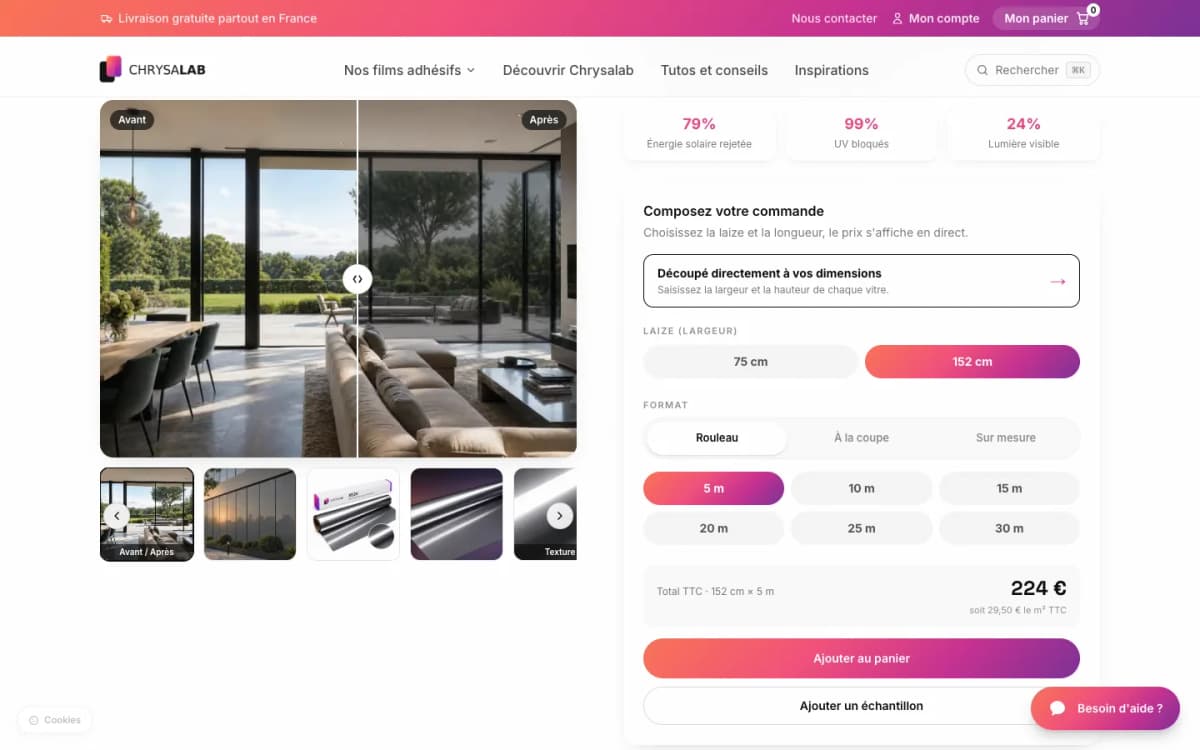
The Chrysalab project shows how catalogue, explanations and dimension selection work together. It is not a template to copy unchanged: your own catalogue determines the useful screens.
Write down rules the customer never sees
This is often the least spectacular part of the document, and the part that prevents the most misunderstandings. Two shops can look similar while requiring very different work behind the “Order” button.
| Topic | Decision to document | Expected check |
|---|---|---|
| Prices | Public and trade prices, quantities and applicable promotions. | The right amount appears for the right customer and variant. |
| Stock | Source of truth, update frequency and out-of-stock handling. | An order is not processed against inconsistent availability. |
| Delivery | Served areas, carriers, weight and dimension constraints. | Methods and charges fit the address and basket. |
| Payment | Accepted methods, statuses and failed or delayed payments. | An order is not prepared merely because someone visited the return page. |
| After-sales | Cancellations, returns, refunds and responsible people. | The customer and team see a consistent order state. |
For payment, Stripe explains that server-side confirmation is needed for reliable order processing: returning to a page is not enough. Translate this principle into an expected project outcome, even if you do not write code. Stripe documentation on payment fulfilment.
Make room for your team’s work
The back-office deserves its own chapter. Who creates products, edits prices, finds orders, prints labels or answers requests? Which operations already happen in your management software and must not be entered twice?
List existing tools, their roles and intended exchanges. “Connect the ERP” is too vague. “Read stock from the ERP and send it paid orders with error checks” starts to become quotable. The agency needs to verify APIs, access rights, limits and any fees for the software concerned.
The Reflectiv project combines a catalogue, trade customer area, configurator and carrier integrations. This shows the value of treating a site as a sales and processing tool, not an isolated showcase.
Also specify what you need to do independently: edit text, add a category, launch a promotion or view orders. Ask for onboarding and guidance suited to those tasks, not just an administrator login.
Plan SEO and content from the start
List the product families customers search for and the questions preceding a purchase. Decide which pages answer them: categories, products, choice guides or services. Giving each page a clear purpose is more useful than asking for “an SEO-optimised site” without detail.
Allocate writing, photographs and approvals. If your team supplies text, say when. If the provider writes it, identify source information and agreed volumes. AI tools can help prepare a catalogue; they must not invent compatibility, guarantees or product characteristics.
For a redesign, inventory old URLs and map them to new ones when addresses change. Google recommends preparing this mapping, redirects and post-migration monitoring, while noting that visibility can fluctuate. Google’s migration guidance.
This then becomes a website redesign with migration planning, not just a new layout.
Define how you will accept delivery
Return to the three initial orders. Test them on phone and computer with the relevant provider’s test payment methods. Add an out-of-stock case, bad address and return after failure. Verify the back-office and received messages, not just the screen.
The document must distinguish blocking defects, presentation changes and new requests. Agree who approves, feedback deadlines and handling of issues after launch. Ask what hosting, backups, maintenance and support cover, including limits and costs.
A question for the agency: “Show me how we will verify this feature works.” A concrete scenario and result are worth more than an adjective such as “high-performing”.
A short template to start the discussion
Start with the following headings. Fill them with real information and explicitly leave unknowns to be decided with the provider.
- Our business and customers: what we sell, to whom, in which areas and with which priority objective.
- Three representative orders: the typical case, complex case and incident to handle.
- Catalogue and commercial rules: products, variants, prices, trade accounts, stock and shipping.
- Tools and organisation: existing software, tasks to automate, roles and access.
- Content and visibility: pages, available data, writing, photos and any migration.
- Budget and schedule: budget, recurring costs, fixed deadlines and what can wait.
- Acceptance and follow-up: validation criteria, training, maintenance, data export and handover.
Download the template to complete, without a form.
Once this foundation is ready, our guide to reading web agency quotes helps compare proposals. To scope the project with us, explore our e-commerce website approach or present your project on a video call.

